VAT books: purchases and sales
What the VAT purchase and sales books are, what data they carry, how they relate to the VAT return and e-invoicing, and how to produce them in GoSoft.
The VAT books (purchase book and sales book; registro de compras y ventas in Peru, libro de compras y ventas IVA in Bolivia) list, document by document, the invoices received and issued in the period with their taxable base and tax. They support the monthly VAT return.
- Explain what each VAT book contains.
- Relate the books to the return and to the general ledger.
- Produce the purchase and sales books in GoSoft.
What each row contains
| Field | Example |
|---|---|
| Invoice date | 10/26/2026 |
| Invoice number and authorization code | 8791 · authority code |
| Tax ID and name of supplier or customer | NIT 40102300 · Persona0011 Apellido0011 |
| Total amount | 56,308.00 |
| Non-taxable or exempt amounts | 0.00 |
| Base for input or output tax | 56,308.00 |
| VAT | 7,320.04 |
Book, ledger and return must agree
> **Total VAT in the purchase book = the month's movement in Input VAT > Total VAT in the sales book = the month's movement in *Output VAT***
Both totals are what goes into the VAT return. If they do not match, invoices are unrecorded, recorded in another account or in another month.
In most countries in the Americas invoices are electronic and the tax authority already knows each document (SIAT in Bolivia, DIAN in Colombia, SAT in Mexico, SUNAT in Peru, SII in Chile, ARCA in Argentina, SEFAZ in Brazil). Your books must match what the authority has on record; often the book is filed or validated in the tax portal. In the US there is no VAT; sales tax is reported to each state.
In GoSoft, step by step
Open Financial reports → VAT books.
Choose the units, Purchase book or Sales book, and the period (usually the month).
Click View. You see the documents, total amount, taxable base and VAT, with the period totals.
gosoft.app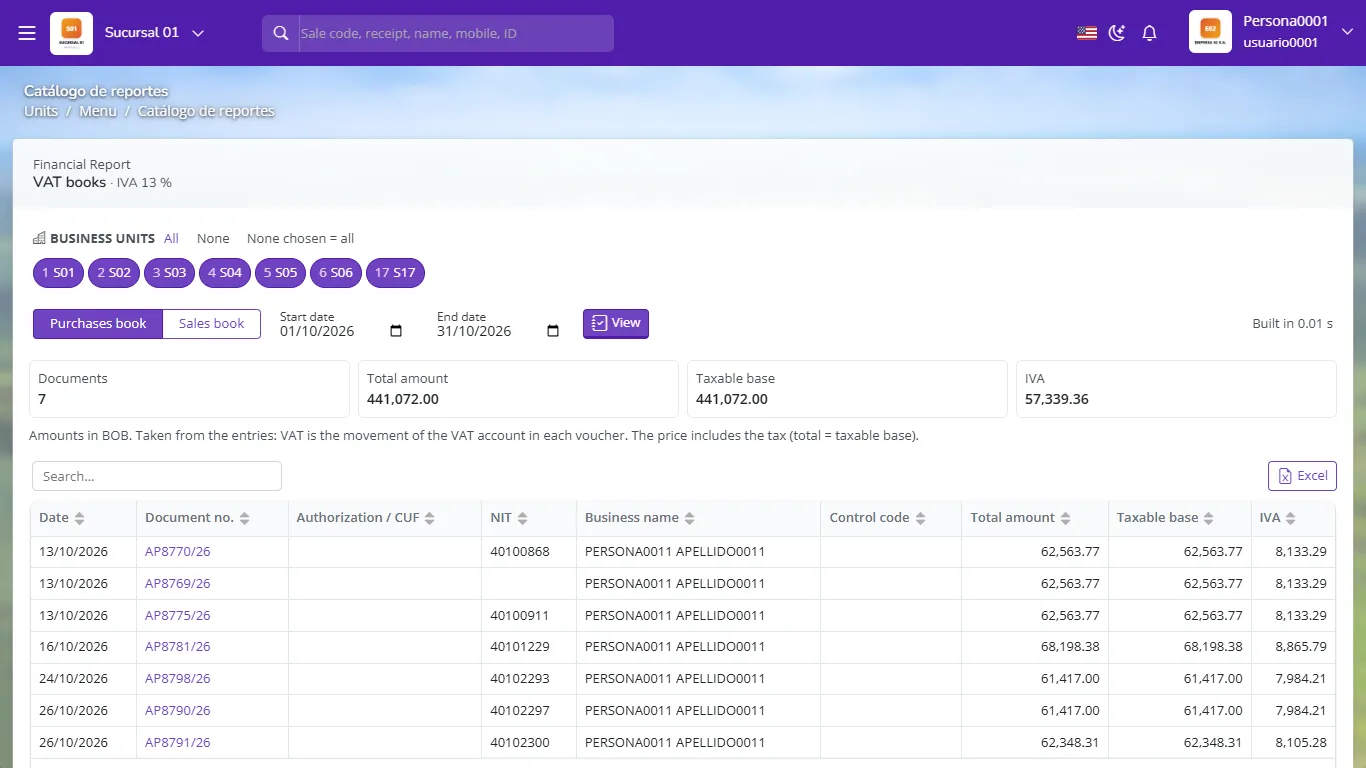
VAT purchase book with taxable base and VAT per document Export to Excel to upload to your tax authority's portal or to reconcile.
Compare the VAT total with the input and output VAT account balances (General ledger) and with the draft return.
If you ever changed the input or output VAT account in the settings, GoSoft also includes the previous accounts (even if inactive), so the book for past periods does not lose documents.
- Recording the purchase in one month and the invoice in another: the book and the return do not match.
- Including in the purchase book invoices that do not give input tax credit.
- Not voiding cancelled sales invoices in the book.
Which ledger account must the sales book's VAT total match?
The period's movement in the output VAT account.
What are the VAT books for?
To support the monthly VAT return with the detail of each document.
Why can a real estate company's sales book be empty?
Because in many countries the sale of homes or lots is exempt or outside VAT.