Collecting installments, arrears and interest
How each installment of a real estate installment sale is booked: principal against the receivable, interest as finance income, arrears, discounts, VAT when the installment is invoiced, and the accounts receivable report in GoSoft.
Once the contract is signed, the company spends months or years collecting installments. Each collection has an entry GoSoft builds by itself: it splits principal from interest, records late fees if collected and leaves the receipt ready to print.
- Write the entry for an installment with principal and interest.
- Understand how arrears are computed and recorded.
- Record a collection in GoSoft and read the receivables report.
The collection entry
Following the previous lesson, the customer pays installment 1: 2,541,967.50 (principal 2,001,967.50 + interest 540,000.00).
| Account | Debit | Credit |
|---|---|---|
| Bank | 2,541,967.50 | |
| Accounts receivable (Persona0001 Apellido0001) | 2,001,967.50 | |
| Finance income · financing interest | 540,000.00 | |
| Equal totals | 2,541,967.50 | 2,541,967.50 |
And the down payment of 6,000,000 (all principal):
| Account | Debit | Credit |
|---|---|---|
| Cash | 6,000,000.00 | |
| Accounts receivable (Persona0001 Apellido0001) | 6,000,000.00 | |
| Equal totals | 6,000,000.00 | 6,000,000.00 |
- Debits the chosen fund (cash or bank) for the total received.
- Credits the main holder's receivable for the principal of the installments paid.
- Credits interest for the interest portion, with the lot as analytical detail.
- If the installment is invoiced (in countries where each installment requires an invoice), it splits out the VAT included and moves it to output VAT.
- If the contract has commissions paid as the customer pays, it generates the salesperson's commission payable (see Commissions).
- Updates the status of the installments and the contract (for example, to Paid when fully settled).
Arrears and discounts
When an installment is paid after its due date, the contract may provide for default interest or a penalty per day late. GoSoft computes the days in arrears and the arrears amount of each installment in the payment plan.
| Concept | Treatment |
|---|---|
| Arrears collected | Finance income (default interest) in the month collected |
| Arrears waived | No income recorded; noted on the receipt |
| Early payment discount | Reduces what the customer pays; recorded with the collection |
Until collected, arrears are an uncertain right. Booking them as income early inflates results. GoSoft shows them in the plan as information and only books them when the customer pays.
In GoSoft, step by step
Open the contract and go to Commercial → Payment plan. Overdue installments show the days and amount of arrears.
gosoft.app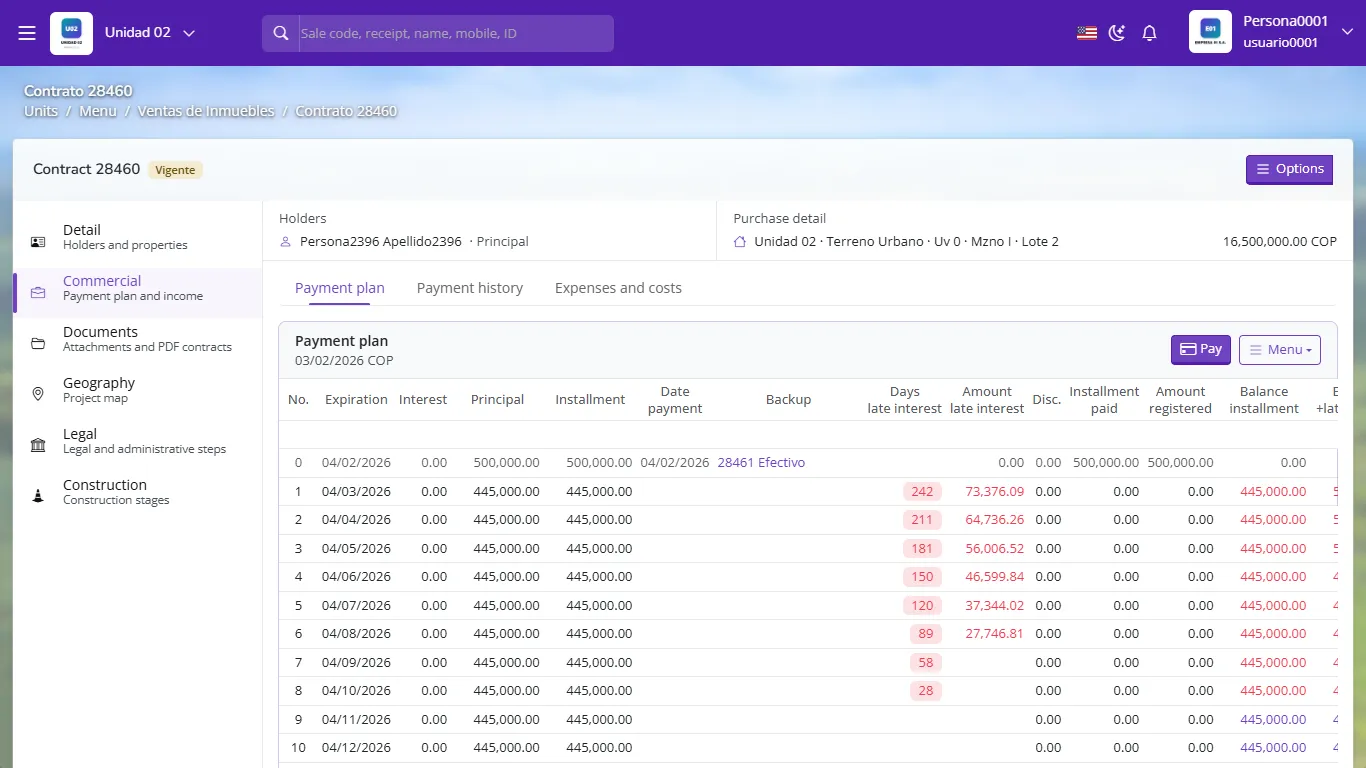
Payment plan with arrears per installment Click Pay. Choose the date, the fund (cash or bank), the document (cash, transfer, deposit) and tick the installments the customer pays. You can apply arrears, waive them or give a discount.
Confirm. GoSoft generates the receipt and its automatic receipt voucher. You can print both.
gosoft.app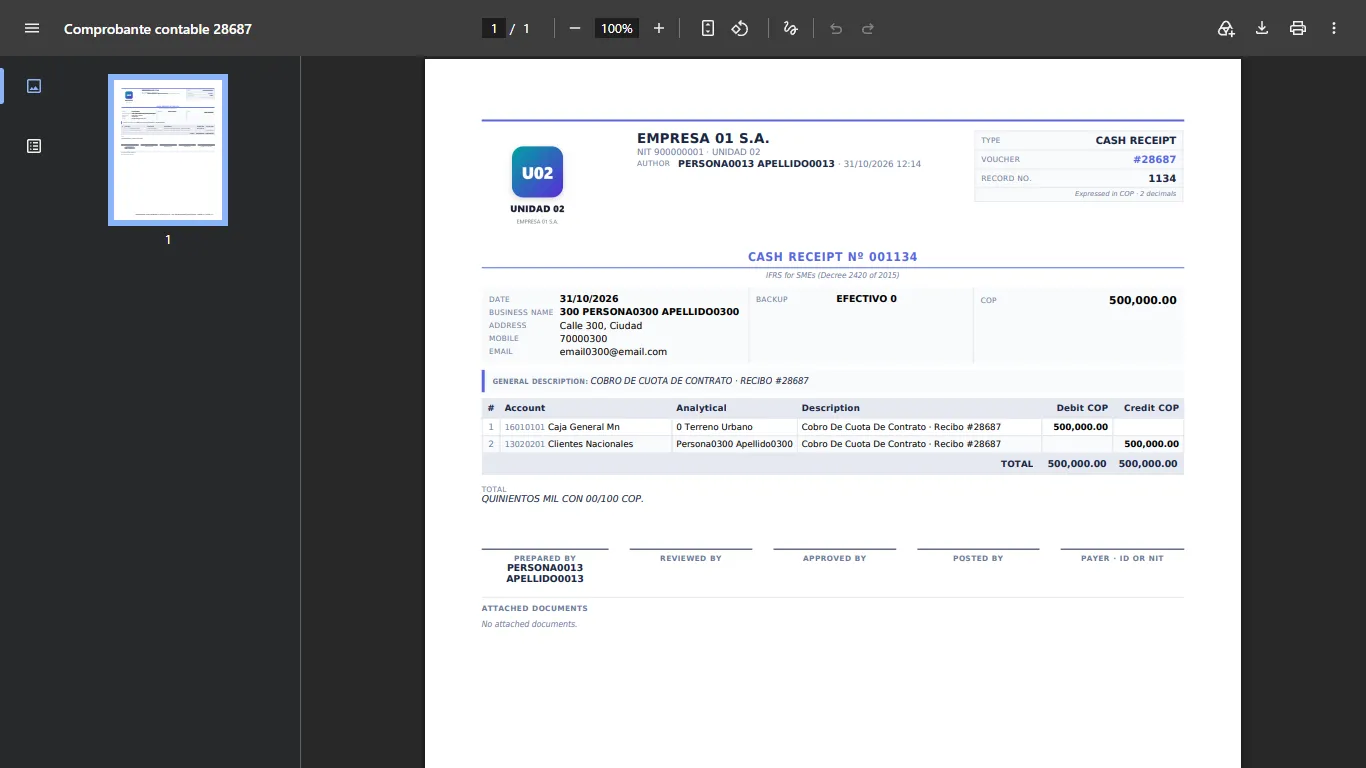
The collection voucher as a PDF To see the whole portfolio open Accounts receivable: choose the cut-off date and type (properties) and click Filter. You will see, by customer, overdue and upcoming installments, arrears and balance.
gosoft.app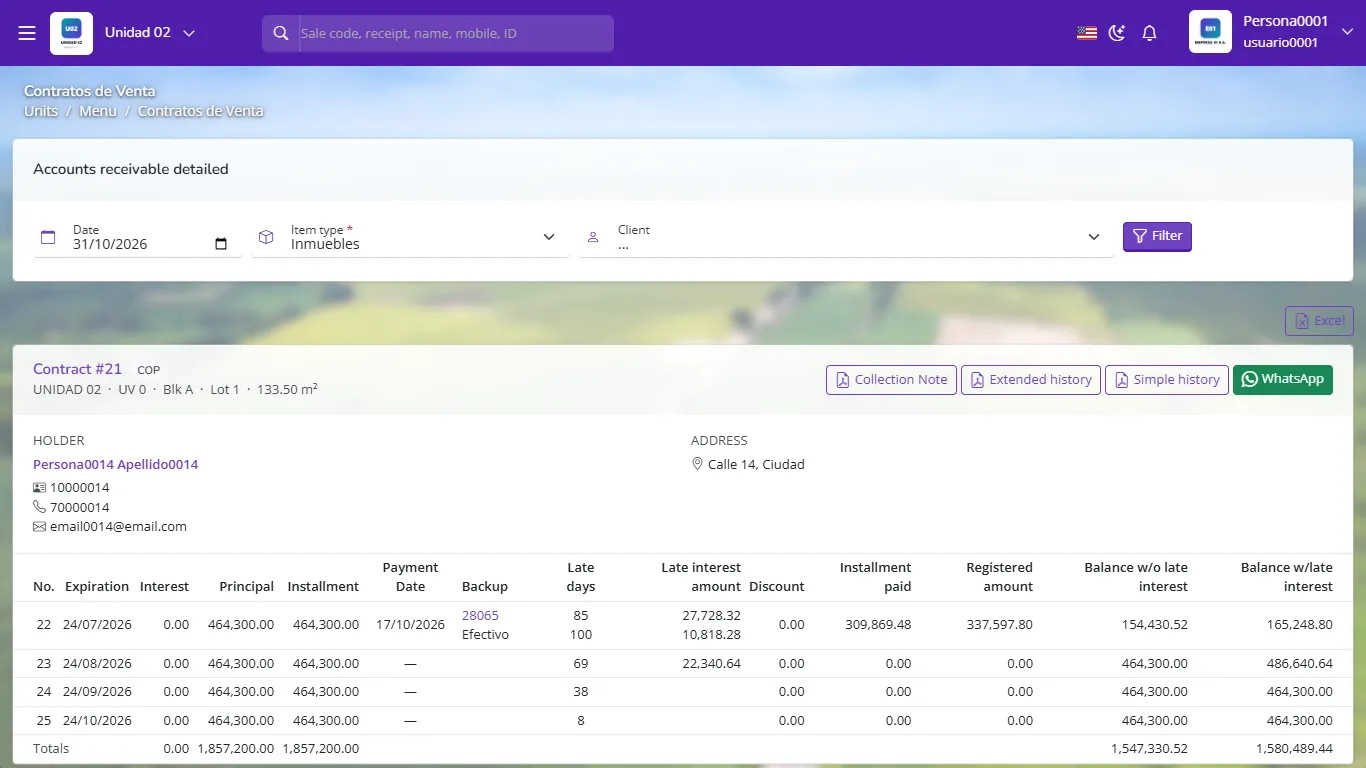
Accounts receivable detailed by customer and installment
The receivables report total (outstanding principal) must equal the balance of Accounts receivable on the balance sheet. If it does not, look for contracts without an entry or voided collections in accounting health.
- Crediting the whole collection to the receivable without splitting interest: the customer balance goes negative and finance income disappears.
- Booking arrears as income when computed instead of when collected.
- Recording the collection in a fund other than the one that actually received the money: the bank reconciliation will not tie.
The customer pays an installment of 1,500,000: 1,200,000 principal and 300,000 interest. Write the entry.
Debit bank 1,500,000; credit accounts receivable 1,200,000; credit finance income (interest) 300,000.
When are arrears recorded as income?
When collected. Before that they are only information in the payment plan.
Which report shows the portfolio by customer with overdue and upcoming installments?
Accounts receivable.