Taxonomy: each item's account
What GoSoft's item accounting taxonomy is: how each product, service or expense item links to its ledger account, its use (expense, inventory, fixed asset) and its VAT, and how to fix warnings.
When you record a purchase you do not choose ledger accounts: you choose items (paper, fuel, professional fees, a computer, a case of merchandise). The taxonomy is the table that says which account each item goes to, what it is used for and what VAT it carries. Buyers do not need to know accounting and the entry comes out right.
- Explain the item → use → account → VAT link.
- Review and correct the item taxonomy in GoSoft.
- Understand the taxonomy warnings.
Item, use and account
| Item | Use | Account | Input VAT % |
|---|---|---|---|
| Stationery | Expense | Office supplies | 19 |
| Laptop | Fixed asset | Computer equipment | 19 |
| Merchandise for resale | Inventory | Merchandise inventory | 19 |
| Accountant's fees | Expense | Professional fees | 19 |
| Health contributions | Expense | Health contributions | 0 |
The use sets the account class: an expense goes to profit or loss, a fixed asset to non-current assets (and is depreciated), inventory to current assets (and becomes cost when sold).
In GoSoft, step by step
Open Financial reports → Taxonomy. At the top you see the country and the current VAT rate.
gosoft.app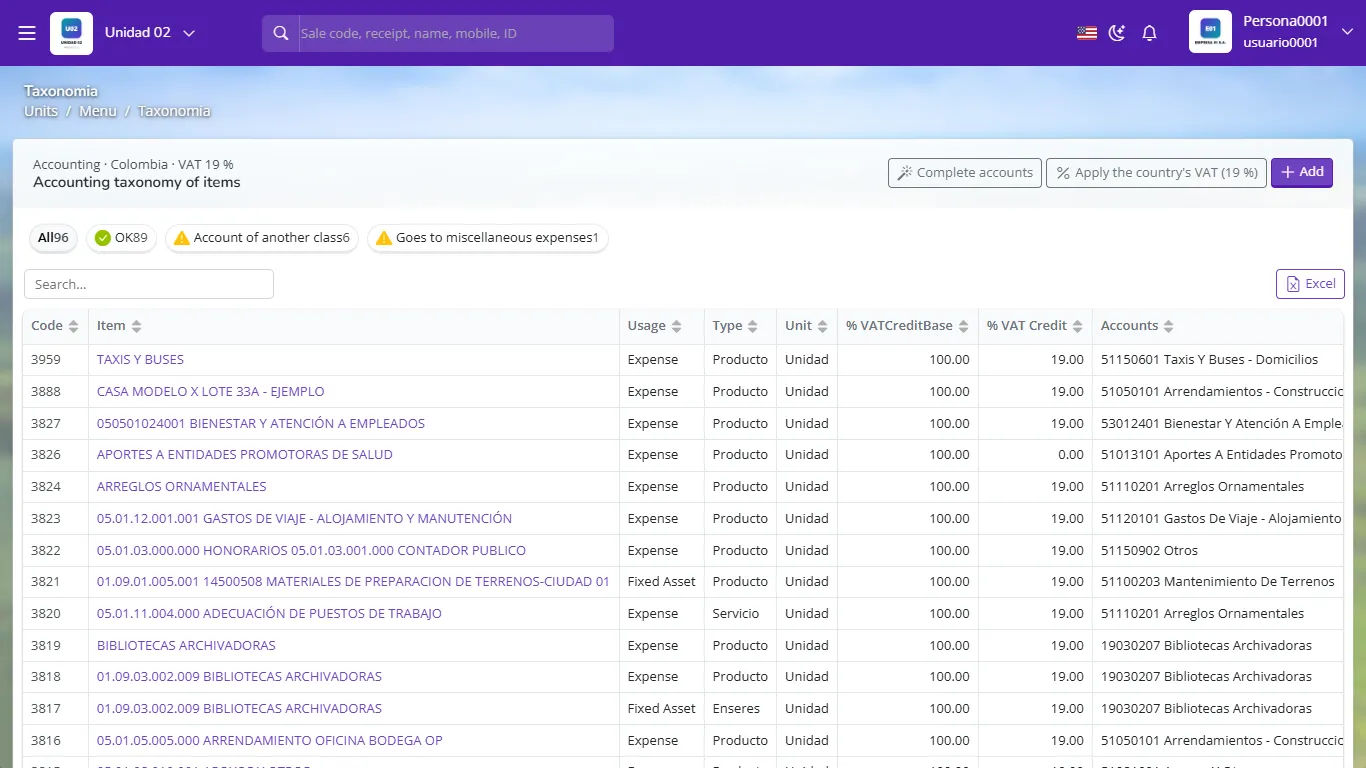
Item accounting taxonomy with use, type, VAT and account Filter with the tags: OK, Account of another class (for example, a fixed asset pointing to an expense account) or Goes to miscellaneous expenses (items without their own account).
Click an item to change its use, account or input VAT percentage.
Complete accounts automatically assigns a suitable account to items that have none.
Apply the country's VAT sets the current rate on every taxable item.
A purchase recorded with a misclassified item ends up in the wrong account. Reviewing taxonomy warnings avoids adjustments at closing.
- Classifying as an expense an asset that lasts years (it should be a fixed asset).
- Leaving items in "miscellaneous expenses": the income statement loses detail.
- Applying 19% input VAT to an exempt or non-deductible item.
What does an item's taxonomy define?
Its use (expense, inventory or fixed asset), its ledger account and its input VAT percentage.
A computer is classified as an expense. Which warning would you see and how do you fix it?
Account of another class or a wrong classification; change the use to fixed asset and the account to computer equipment.
What does the Complete accounts button do?
It automatically assigns a suitable account to items that have none.