Accounting vouchers: receipt, payment, transfer and adjustment
The four types of accounting voucher (receipt CI, payment CE, transfer CT and adjustment CA), when to use each one, sample entries and how to record them in GoSoft with quick, simple or classic entry.
The accounting voucher (journal voucher) is the internal document where an entry is written. It carries a date, number, type, narration, the debit and credit lines and the supporting documents. It is the basic unit of manual accounting.
- Choose the right voucher type for each operation.
- Record a voucher in GoSoft in three ways: quick, simple and classic.
- Attach support and review the printout.
The four types
| Type | Code | When it is used | Example |
|---|---|---|---|
| Receipt | CI | Money comes into cash or banks | Capital contribution, loan received, customer payment outside a module |
| Payment | CE | Money leaves cash or banks | Rent, utilities, taxes paid |
| Transfer | CT | No cash movement | Provisions, accruals, reclassifications, depreciation, credit sales |
| Adjustment | CA | Corrections and adjustments | Fixing an error, closing adjustments, inventory differences |
Numbering by type helps the audit: all October payments form a continuous CE series, and each must have its payment support. In the journal you can filter by type.
Examples
Payment: office rent
| Account | Debit | Credit |
|---|---|---|
| Rent expense | 3,500,000.00 | |
| Bank | 3,500,000.00 | |
| Equal totals | 3,500,000.00 | 3,500,000.00 |
Receipt: bank loan
| Account | Debit | Credit |
|---|---|---|
| Bank | 150,000,000.00 | |
| Bank loans | 150,000,000.00 | |
| Equal totals | 150,000,000.00 | 150,000,000.00 |
Transfer: accrued audit fees
| Account | Debit | Credit |
|---|---|---|
| Professional fees expense | 2,200,000.00 | |
| Fees payable | 2,200,000.00 | |
| Equal totals | 2,200,000.00 | 2,200,000.00 |
Adjustment: correcting an account
| Account | Debit | Credit |
|---|---|---|
| Equipment maintenance | 450,000.00 | |
| Office supplies | 450,000.00 | |
| Equal totals | 450,000.00 | 450,000.00 |
In GoSoft, step by step
Open Financial reports → Vouchers. The list shows vouchers with filters by unit, type, status, origin (manual or automatic) and dates.
gosoft.app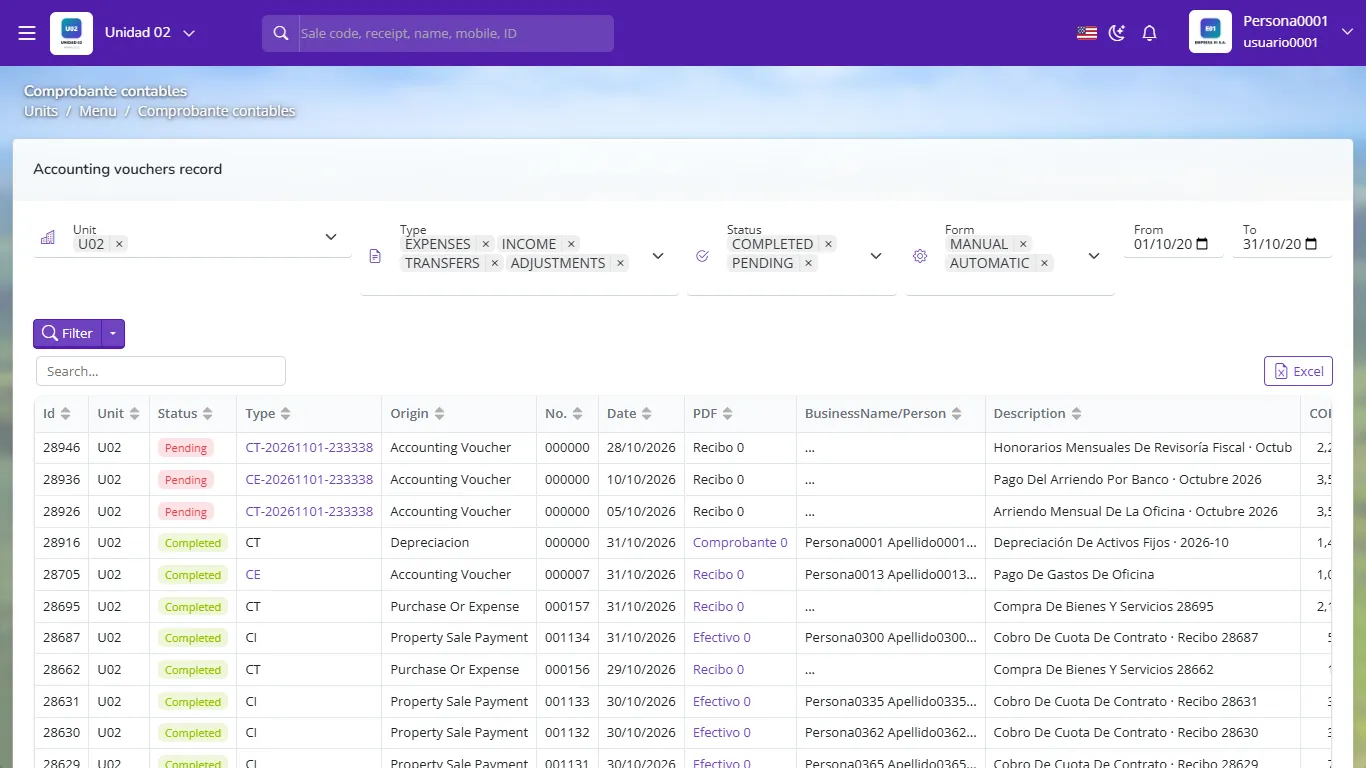
Accounting voucher list with its filters From the Filter ▾ button choose how to record: Quick entry (two accounts, ideal for simple payments), Simple entry (several lines in one window) or Classic entry (full screen with every option).
In classic entry fill in the date, unit, type (receipt, payment, transfer or adjustment), person and narration.
gosoft.app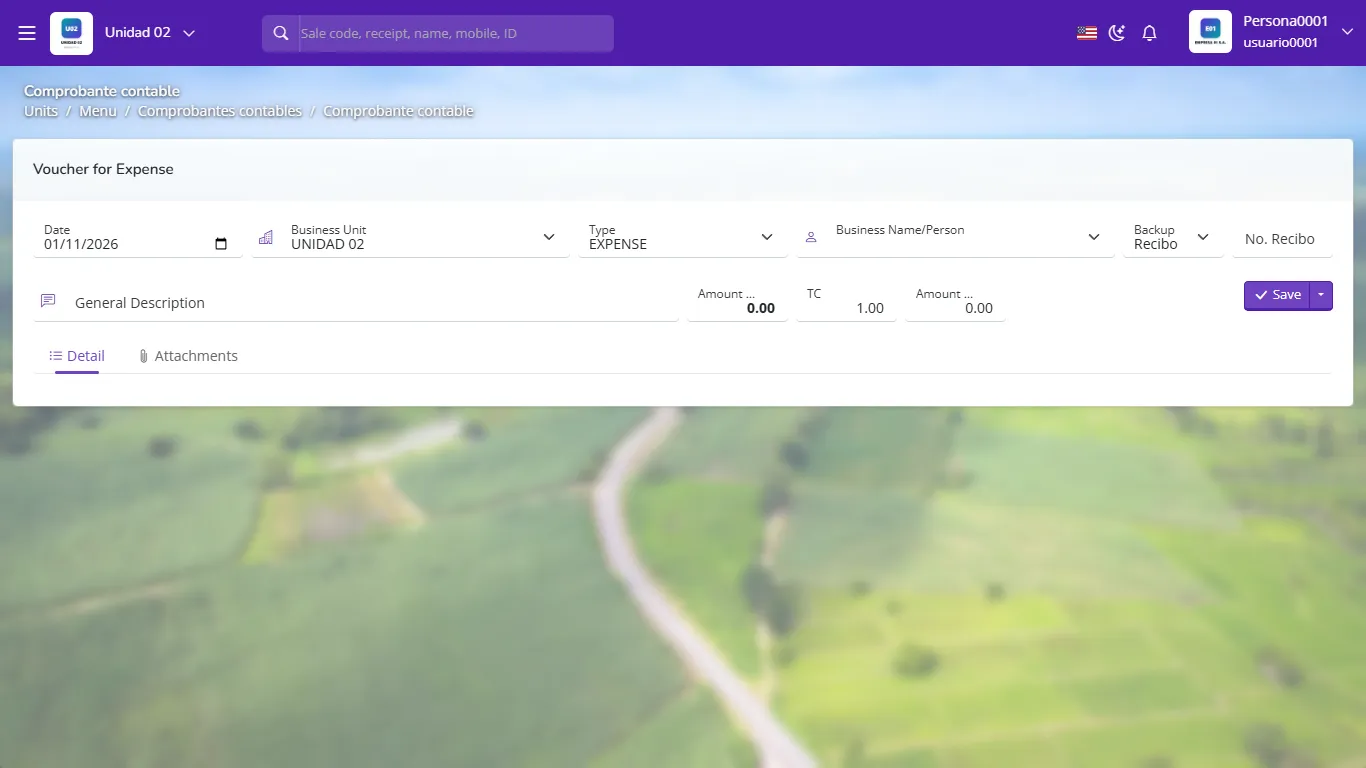
New voucher in classic entry Add the lines: detail account, party (person) if the account requires it, cost center, description, debit or credit. GoSoft shows the difference live until it balances.
Attach the support (invoice, transfer) in the Attachments tab.
Save: it stays pending (draft) so you can review it. When it is correct, finalize it so it gets its final number and enters the books.
gosoft.app
A finalized voucher with its lines
From a voucher you can clone it (copy everything to a new one), reverse lines (useful to cancel with an opposite entry) or copy lines from another voucher. For expenses that repeat every month use recurring entries.
Printing
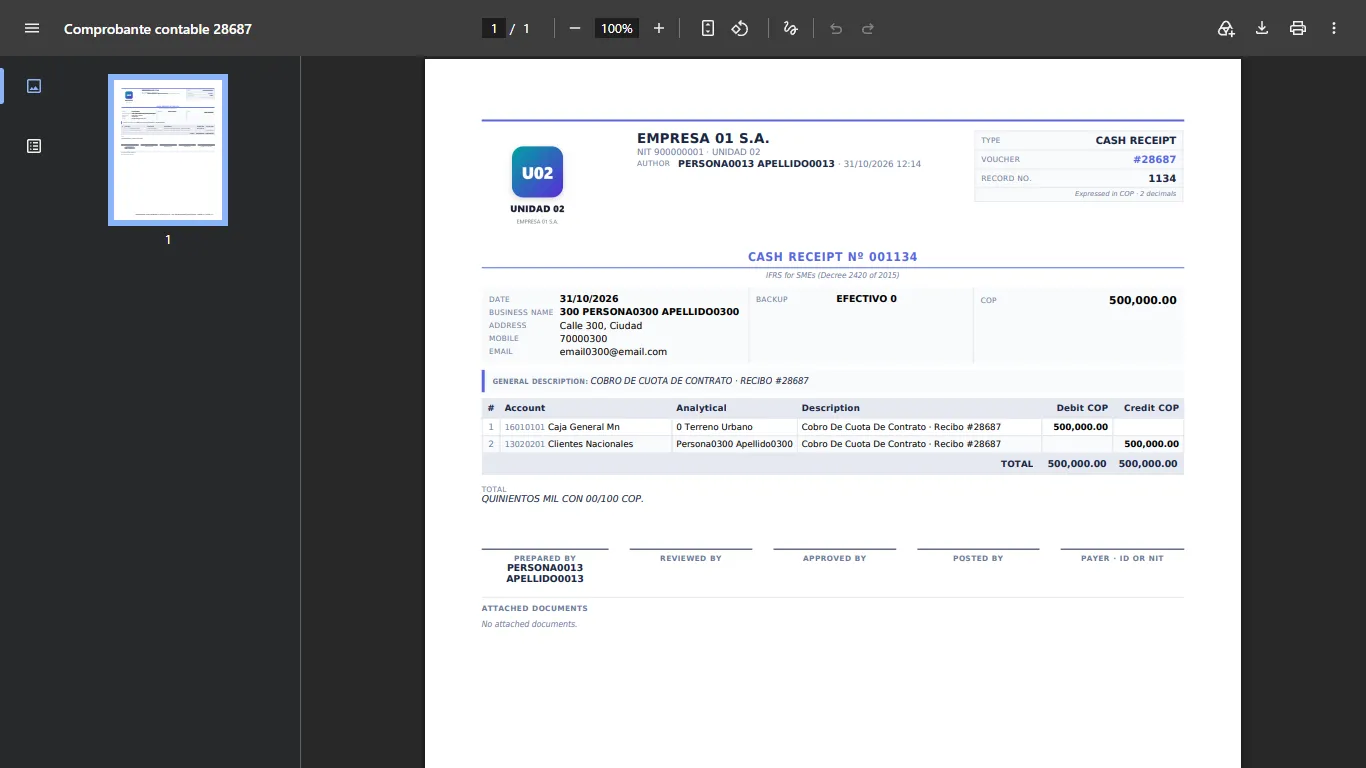
Each voucher prints to PDF with the logo, number, signatures and account detail. It is the support signed by whoever authorizes the payment.
- Recording a payment with a transfer voucher: payments must be CE so the payment series is complete.
- Empty or generic narrations ("misc."): the narration must say what was paid, to whom and why.
- Leaving vouchers pending for months: they do not enter the books or the statements.
You pay the electricity bill by bank transfer. Which voucher type do you use?
Payment (CE), because money leaves the bank.
You record the month's depreciation. Which voucher type is it?
Transfer (CT): there is no cash movement.
Does a pending voucher appear in the balance sheet?
No. Only finalized vouchers enter the books and financial statements.
Which entry mode suits a simple two-account payment?
Quick entry.