Bank reconciliation
What a bank reconciliation is, why the bank balance and the book balance differ (deposits in transit, outstanding checks, bank charges and credits), how to do it step by step and import the statement in GoSoft.
The bank reconciliation compares, item by item, what the books say about a bank account with what the bank statement says. It is the most important control over money: if you do not reconcile, you do not know whether something is missing or extra.
- Explain why the bank balance and the book balance almost never match.
- Classify reconciling items and record the adjustments.
- Reconcile an account in GoSoft, import the statement and close the month.
Why they do not match
| Item | In the books | In the bank | What to do |
|---|---|---|---|
| Deposit in transit | Yes | Not yet | Wait: it will appear on the next statement |
| Outstanding check or transfer | Yes | Not yet | Wait; if very old, review |
| Bank fee or charge | No | Yes | Record in the books |
| Interest earned | No | Yes | Record in the books |
| Unidentified customer transfer | No | Yes | Identify and record the collection |
| Recording error | Different | Different | Correct |
Example
At 10/31/2026 the books for Bank · account 0001 show 25,000,000 and the statement 24,120,000.
| Item | Amount |
|---|---|
| Balance per statement | 24,120,000 |
| + Deposit in transit of 10/31 | 2,000,000 |
| − Transfer issued not yet debited | 1,300,000 |
| = Adjusted bank balance | 24,820,000 |
| Balance per books | 25,000,000 |
| − Unrecorded bank fees | 30,000 |
| − Unrecorded automatic utility debit | 150,000 |
| = Adjusted book balance | 24,820,000 |
Both adjusted balances agree. Now record in the books the items that were only in the bank:
| Account | Debit | Credit |
|---|---|---|
| Bank charges · fees | 30,000.00 | |
| Utilities | 150,000.00 | |
| Bank · account 0001 | 180,000.00 | |
| Equal totals | 180,000.00 | 180,000.00 |
In GoSoft, step by step
Open Financial reports → Bank reconciliation. Choose the bank account and the month, and click Reconcile.
gosoft.app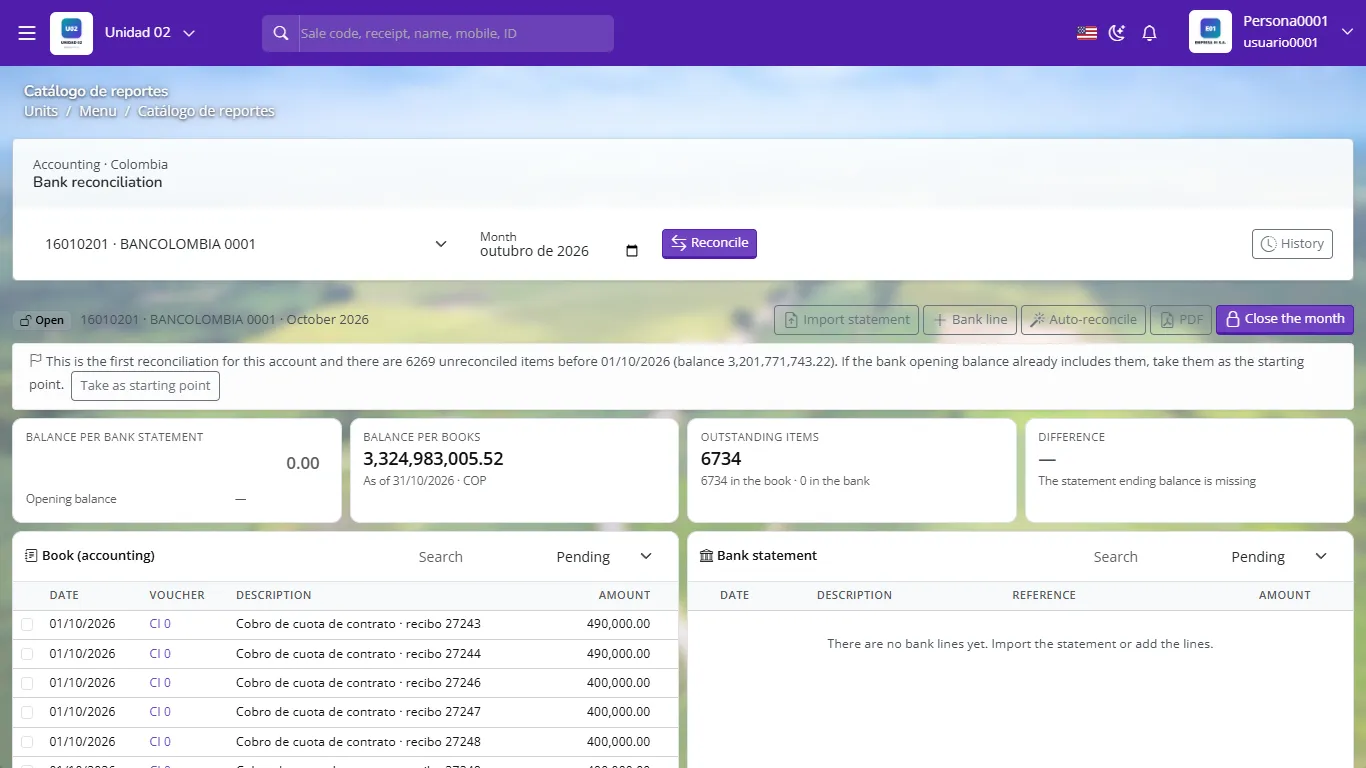
Bank reconciliation: books on the left, statement on the right The first time, if there are old unreconciled movements, GoSoft offers to take them as the starting point (the bank's opening balance already includes them).
Load the statement: Import statement (bank Excel or CSV) or Bank line to add lines by hand. Enter the statement's closing balance.
Click Auto-reconcile: GoSoft matches books and bank by amount and date. Match the rest by hand by ticking one line on each side.
Record what is only in the bank (fees, interest, automatic debits) with a voucher and match again.
When the difference is zero, download the PDF and click Close the month. History keeps each closed reconciliation.
With one month of movements reconciliation takes minutes. With a whole year piled up it can take days and errors can no longer be fixed in time.
- "Balancing" the difference with a generic adjustment without investigating.
- Leaving checks outstanding for more than six months without analysis.
- Reconciling against the online available balance instead of the official closing statement.
A deposit recorded in the books on the 31st appears in the bank on the 2nd of the following month. What is it?
A deposit in transit: you wait; no adjustment.
The statement shows a fee that is not in the books. What do you do?
Record it in the books: debit bank charges, credit bank.
When is the month closed in GoSoft's reconciliation?
When the difference between the adjusted book balance and the statement balance is zero.