Comparative statements and by cost center
How to analyze financial statements comparing months, years, business units and cost centers: horizontal and vertical analysis, variances and how to use GoSoft's comparative statements.
A number alone says little. "We earned 39 million" makes sense when you know last year it was 25, that 80% came from a single project or that selling expenses grew faster than sales. Comparative statements put figures side by side.
- Do horizontal (across periods) and vertical (over a total) analysis.
- Compare results by month, unit and cost center.
- Use GoSoft's comparative statements.
Horizontal analysis
Compares the same account across periods:
> Change % = (Current period − Prior period) / Prior period × 100
| Item | 2025 | 2026 | Change | % |
|---|---|---|---|---|
| Sales revenue | 250,000,000 | 300,000,000 | 50,000,000 | 20.0% |
| Selling expenses | 30,000,000 | 45,000,000 | 15,000,000 | 50.0% |
Reading: selling expenses grew faster than sales. Review commissions and advertising.
Vertical analysis
Expresses each account as a percentage of a total (sales on the income statement, total assets on the balance sheet):
| Item | 2026 | % of sales |
|---|---|---|
| Sales revenue | 300,000,000 | 100.0% |
| Cost of sales | 120,000,000 | 40.0% |
| Gross profit | 180,000,000 | 60.0% |
| Administrative expenses | 70,000,000 | 23.3% |
In GoSoft, step by step
Open Financial reports → Comparative statements.
Choose the statement (income or financial position), the units and how to compare: by months of the year, by years, by business unit or by cost center.
Click View. Each column is a period, unit or cost center; at the end you see the total and variances.
gosoft.app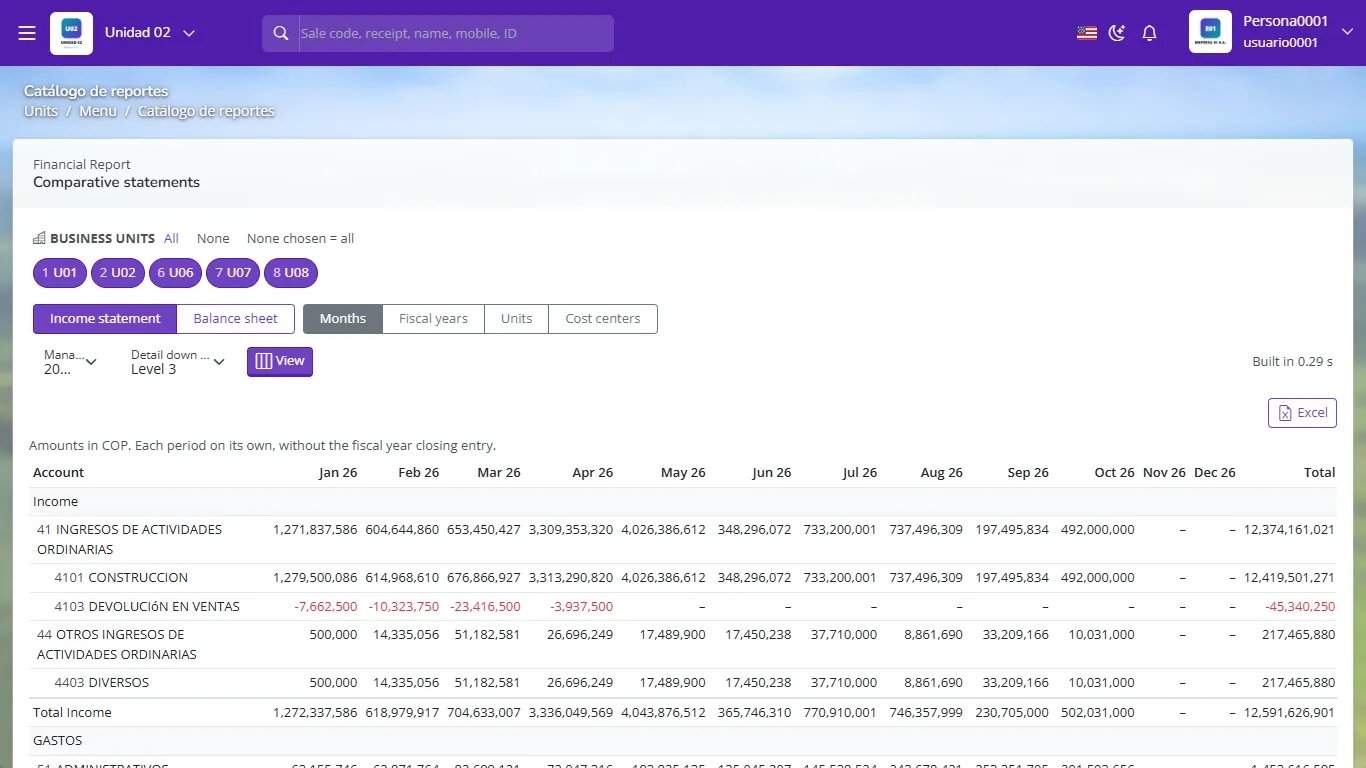
Comparative statements with one column per period Export to Excel to chart or dig deeper.
The most useful comparison for management is actual vs. budget: it tells not only what changed but whether it changed relative to plan. See Budget vs. actual.
Sales went from 200 to 230. What is the percentage change?
(230 − 200) / 200 = 15%.
What does vertical analysis of the income statement show?
Each account as a percentage of sales.
How do you see each area's spending in GoSoft?
In Comparative statements, choosing the comparison by cost center.