Recurring entries
How to automate entries that repeat (rent, fees, insurance, loan installments) with recurring entries in GoSoft: frequency, day, draft or automatic mode and generating overdue ones.
Many operations repeat identically every month: rent, the accountant's fees, an insurance installment, amortization of a prepaid expense. Writing them by hand every month is slow and easy to forget. A recurring entry is a template GoSoft turns into a voucher on each date.
- Identify which operations are worth automating.
- Create a recurring entry with its frequency and mode.
- Generate, review and pause recurring vouchers.
What to automate
| Yes | No |
|---|---|
| Fixed or nearly fixed amounts: rent, fees, insurance | Operations born in a module (sales, collections, purchases) |
| Monthly provisions (vacation, bonuses) | Variable expenses that depend on a different invoice each time |
| Amortization of prepaid expenses | Depreciation (GoSoft computes it in Fixed assets) |
Example: accruing rent
| Account | Debit | Credit |
|---|---|---|
| Rent expense · cost center Administration | 3,500,000.00 | |
| Rent payable | 3,500,000.00 | |
| Equal totals | 3,500,000.00 | 3,500,000.00 |
And the payment, also recurring, on day 10:
| Account | Debit | Credit |
|---|---|---|
| Rent payable | 3,500,000.00 | |
| Bank | 3,500,000.00 | |
| Equal totals | 3,500,000.00 | 3,500,000.00 |
In GoSoft, step by step
Open Financial reports → Recurring entries. The list shows each template with its unit, frequency, next date, mode, amount and how many vouchers it generated.
gosoft.app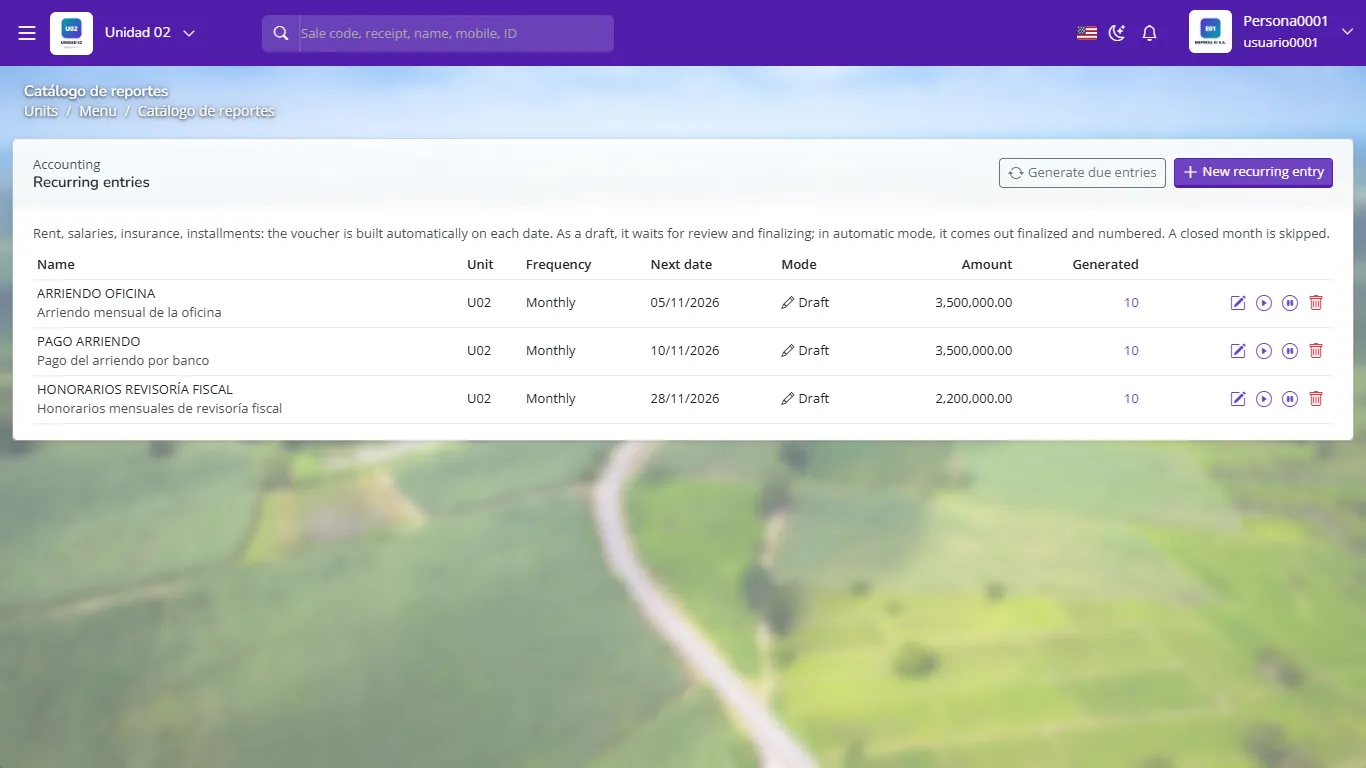
Recurring entries with frequency, next date and mode Click New recurring entry. Give it a name, the narration, the voucher type (CT, CE, CI or CA) and the unit.
Choose the frequency (monthly, bimonthly, quarterly, half-yearly, yearly…), the day of the month, the start date and, if applicable, the end date.
Write the lines as in a voucher: detail account, cost center, description, debit or credit. It must balance.
Choose the mode: Draft (the voucher stays pending for review and finalizing) or Automatic (it comes out finalized and numbered).
Generate overdue creates at once the vouchers whose dates have already passed. A closed month is skipped.
With each row's icons you can edit, generate the next one now, pause or delete the template.
For the first months use draft mode: you review each voucher before finalizing it. When you trust the template, switch it to automatic.
- Leaving active the template of a contract that already ended: set an end date.
- Using recurring entries for variable expenses: the amount will not match the invoice.
- Forgetting to finalize drafts: they do not enter the books.
What is a recurring entry?
An entry template GoSoft turns into a voucher on each date according to its frequency.
What is the difference between draft and automatic mode?
In draft the voucher stays pending for review; in automatic it comes out finalized and numbered.
What happens if a recurring date falls in a closed month?
GoSoft skips it; it does not generate vouchers in closed months.